Zemax LensMechanix Optical-Mechanical Integration Software
| Origin | Beijing, China |
|---|---|
| Manufacturer Type | Authorized Distributor |
| Origin Category | Domestic (China) |
| Model | LensMechanix |
| Price Range | USD 7,000 – 14,000 |
Overview
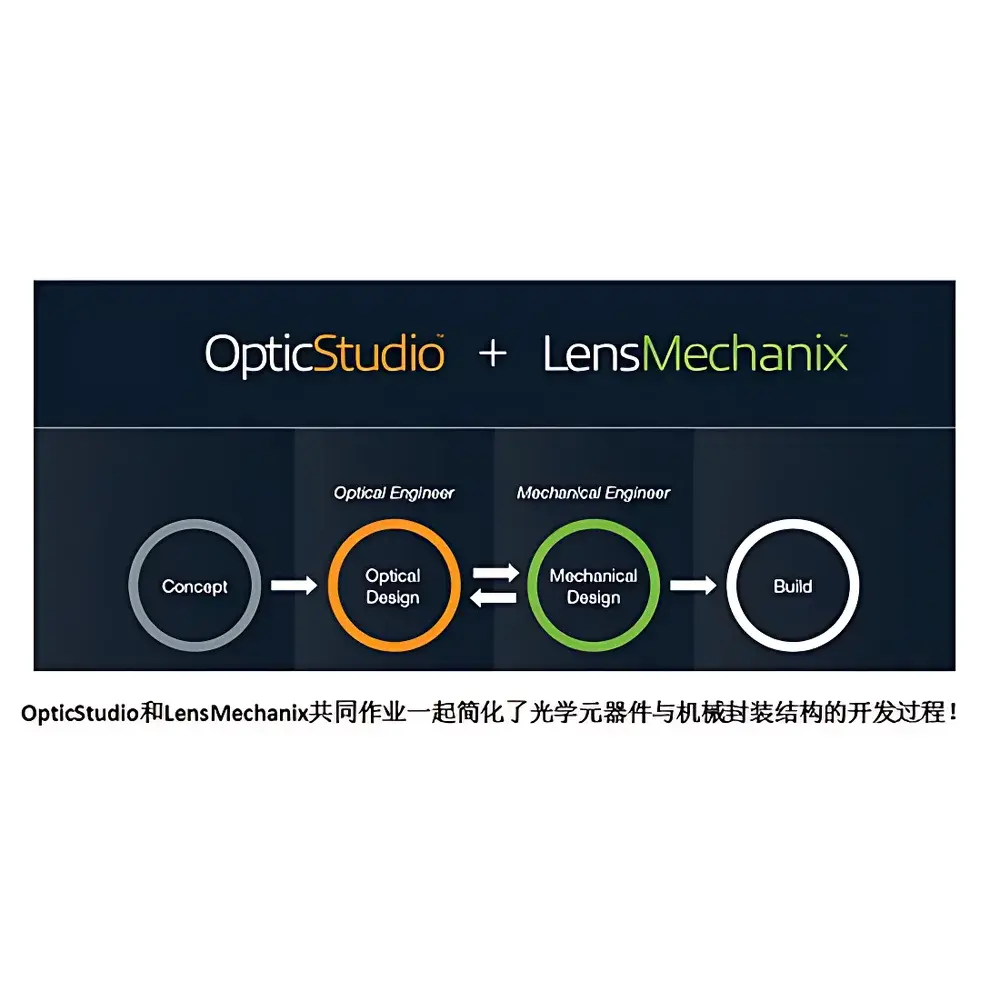
Zemax LensMechanix is a purpose-built optical-mechanical co-design software platform engineered to bridge the functional and data exchange gap between optical design (via Zemax OpticStudio) and mechanical CAD environments—specifically SOLIDWORKS. It operates on a bidirectional, native integration architecture that eliminates lossy intermediate file formats (e.g., STEP or IGES), enabling direct import of precise optical element geometry—including surface prescriptions, tolerances, coating definitions, and ray-fan metadata—from OpticStudio *.zmx files into SOLIDWORKS assemblies. The software implements physics-aware mechanical modeling by preserving optical coordinate systems, chief ray vectors, and real-ray trace paths during translation, allowing mechanical engineers to validate structural clearance, thermal expansion effects, mounting-induced aberrations, and stray light propagation without requiring expertise in optical design theory. LensMechanix is certified as a SOLIDWORKS Gold Certified Partner solution, meaning it complies with SOLIDWORKS API stability, performance, and interoperability standards defined under the SOLIDWORKS Partner Program Level 3 requirements.
Key Features
- Native bidirectional synchronization between Zemax OpticStudio and SOLIDWORKS—no manual re-modeling or geometric approximation required
- Automatic generation of optomechanical parts from OpticStudio lens data, including exact surface sag profiles, clear apertures, and mechanical mounts
- Integrated ray-trace visualization inside SOLIDWORKS: visualize real ray paths, identify vignetting, quantify stray light scatter at mechanical surfaces, and assess irradiance distribution on detectors
- Optical performance summary dashboard: automated pass/fail evaluation against user-defined criteria for spot size (RMS/Geometric), ray blockage percentage, image plane contamination, and chief ray deviation
- Thermal and structural sensitivity analysis: link to SOLIDWORKS Simulation for coupled optomechanical FEA—evaluate how housing deformation or temperature gradients affect wavefront error (WFE) and MTF degradation
- FDA 21 CFR Part 11–compliant audit trail for design change history, including version-controlled .zmx imports, tolerance stack-up modifications, and ray-trace validation logs
Sample Compatibility & Compliance
LensMechanix supports all OpticStudio sequential and non-sequential mode designs exported in native .zmx format (v22.1 and later). It fully accommodates polarization-aware ray tracing, coated surface definitions, bulk scattering models (e.g., BSDF), and detector-based irradiance analysis. The software conforms to ISO 10110-7 (optical element drawing standards), ASME Y14.5–2018 (GD&T for optomechanical interfaces), and supports export of GD&T annotations directly into SOLIDWORKS drawings. All design validation reports comply with GLP/GMP documentation practices, including timestamped, user-identified, and digitally signed verification records required for regulated photonics product development (e.g., medical endoscopes, aerospace EO/IR systems).
Software & Data Management
LensMechanix leverages SOLIDWORKS PDM Professional APIs for revision-controlled management of optical and mechanical design artifacts. Each imported .zmx file is registered with metadata tags (wavelength, field points, configuration state), enabling conditional loading and variant-driven assembly configurations. The software maintains full traceability from initial optical prescription through mechanical iteration to final manufacturing release—supporting ISO 9001:2015 clause 8.3.4 (design and development controls). Export capabilities include CSV-based tolerance sensitivity matrices, PDF-formatted optical performance summaries, and SOLIDWORKS eDrawings files with embedded ray-trace overlays for cross-functional review.
Applications
LensMechanix is deployed across industries where optical performance must be guaranteed under real-world mechanical constraints: precision laser systems (fiber coupling alignment, beam delivery optics), biomedical imaging platforms (confocal microscopes, OCT probes), defense electro-optical sensors (stabilized gimbal mounts, IR window distortion analysis), semiconductor lithography components (reticle stage thermal drift compensation), and AR/VR waveguide illumination modules. It is routinely used to reduce prototyping cycles by 40–60% in programs governed by MIL-STD-810G (environmental testing) and IEC 61000-4-2 (ESD robustness), where early identification of mount-induced wavefront error avoids costly late-stage redesign.
FAQ
Does LensMechanix require a separate OpticStudio license?
Yes—LensMechanix is an add-on module requiring an active OpticStudio Professional or Premium license (v22.1 or newer) and SOLIDWORKS Professional or Premium (2022 or newer).
Can LensMechanix import designs from CODE V or LightTools?
No—it is exclusively integrated with Zemax OpticStudio’s native file architecture and does not support third-party optical design formats.
Is cloud deployment supported?
LensMechanix is installed locally on Windows workstations; it does not operate in SaaS or browser-based environments due to SOLIDWORKS COM API dependencies and high-bandwidth ray-trace data handling requirements.
How does LensMechanix handle multi-configuration optical systems?
It preserves all configurations defined in the source .zmx file—including zoom positions, focus states, and field-dependent mounts—and enables conditional mechanical instantiation per configuration within SOLIDWORKS.
Does it support GD&T annotation export to manufacturing drawings?
Yes—geometric tolerances defined in OpticStudio’s Tolerance Wizard are mapped to SOLIDWORKS DimXpert features and exported with ANSI/Y14.5–compliant callouts in drawing views.