Leica QWin Image Analysis Software
| Brand | Leica |
|---|---|
| Origin | Germany |
| Model | QWin |
| Version Variants | QWin Runner, QWin Lite, QWin Plus, QWin Std, QWin Pro |
| Software Architecture | QUIPS-based modular platform |
| Microscope Integration | Full compatibility with Leica motorized microscopes and digital cameras |
| Pixel Resolution Support | Optimized for >1 MP imaging systems |
| Regulatory Context | Designed to support GLP/GMP-compliant workflows with audit-trail-ready operation (via optional modules) |
| Data Export | TIFF, BMP, JPEG, PNG, CSV, XML |
Overview
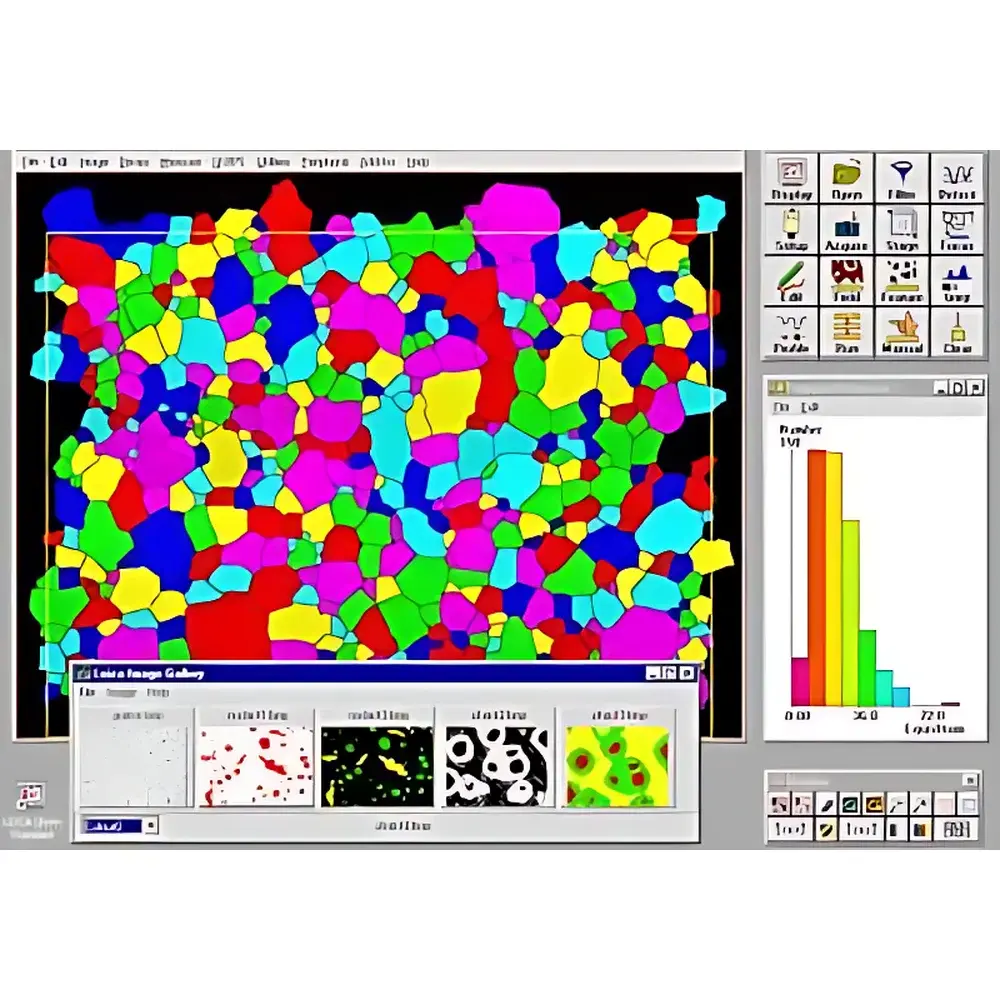
Leica QWin is a modular, professional-grade image analysis software platform engineered specifically for quantitative microscopy applications. Developed by Leica Microsystems in Wetzlar, Germany, QWin serves as the central analytical engine within Leica’s integrated digital microscopy workstations. It implements standardized computer vision algorithms—including threshold-based segmentation, morphometric feature extraction, grayscale intensity profiling, and multi-plane registration—to deliver reproducible, traceable, and statistically robust measurements from optical, fluorescence, and reflected-light microscopic images. The software adheres to core principles of metrological traceability in life science and materials research, supporting calibrated pixel-to-physical-unit conversion and user-defined measurement protocols aligned with ISO 17025 and ASTM E2891–13 guidelines for digital image-based particle and microstructure analysis.
Key Features
- Modular architecture based on the QUIPS (Quantitative Image Processing System) framework—enabling deployment of application-specific analysis routines without code modification
- Five tiered editions (QWin Runner, Lite, Plus, Std, Pro) offering progressive functionality—from basic annotation and manual measurement to fully automated, script-driven workflows
- Native integration with Leica DM-series motorized upright and inverted microscopes, including Z-drive synchronization, stage positioning, filter wheel control, and live camera streaming
- Comprehensive image processing toolkit: dynamic range adjustment, background subtraction, noise filtering (median/Gaussian), edge enhancement, and multi-channel fluorescence overlay
- Advanced quantification modules: time-lapse acquisition scheduling, z-stack projection & fusion, multi-field mosaic stitching, focal series reconstruction, and point-sampling grid analysis
- Embedded QGallery module for metadata-rich image cataloging, version-controlled annotation, and hierarchical sample tagging compliant with MIAME/MINSEQE reporting standards
Sample Compatibility & Compliance
QWin supports analysis of diverse specimen types—including histological tissue sections, metallurgical grain structures, polymer phase domains, mineral thin sections, and cultured cell monolayers—acquired via brightfield, phase contrast, DIC, fluorescence, and polarized light microscopy. All editions comply with data integrity requirements outlined in FDA 21 CFR Part 11 when deployed with electronic signature and audit trail add-ons (available in QWin Std and Pro). The platform facilitates generation of ALCOA+ (Attributable, Legible, Contemporaneous, Original, Accurate, Complete, Consistent, Enduring, Available) records through timestamped measurement logs, operator ID binding, and immutable result export in CSV/XML formats. Validation documentation packages are available for IQ/OQ/PQ execution per GxP laboratory requirements.
Software & Data Management
QWin employs a centralized project database structure that preserves raw image files, processing history trees, parameter sets, and final measurement tables in a single .qwp container file. Each operation—including threshold adjustments, region-of-interest definition, and morphometric calculation—is logged with operator ID, timestamp, and applied algorithm version. Export capabilities include calibrated measurement reports (PDF/RTF), statistical summaries (ANOVA-ready CSV), and publication-grade figure generation with embedded scale bars and legend annotations. Optional network licensing enables concurrent access across departmental workstations, while QWin Server Edition (add-on) provides centralized administration, role-based permissions, and automated backup to NAS or cloud storage endpoints.
Applications
- Materials Science: Grain size distribution (ASTM E112), inclusion counting (ISO 4967), coating thickness mapping, and corrosion pit quantification
- Life Sciences: Neurite outgrowth analysis, mitotic index determination, nuclear morphology profiling (e.g., for apoptosis studies), and immunofluorescence co-localization scoring
- Pharmaceutical QA/QC: Tablet coating uniformity assessment, excipient particle sizing, and crystallinity evaluation via polarized light texture analysis
- Geosciences: Porosity estimation in rock thin sections, mineral phase abundance quantification, and fossil morphometric classification
- Quality Assurance Labs: Automated pass/fail decision logic based on configurable tolerance bands for dimensional, intensity, or spatial pattern metrics
FAQ
Which QWin edition is suitable for GLP-regulated environments?
QWin Std and QWin Pro support full 21 CFR Part 11 compliance when configured with electronic signatures, audit trails, and secure user authentication modules.
Can QWin interface with non-Leica cameras or microscopes?
Native hardware control is limited to Leica motorized systems; however, third-party TIFF/OME-TIFF images can be imported and analyzed using all processing and measurement functions.
Is QUIPS programming required to customize analyses?
No—QWin Std and Pro include drag-and-drop workflow builders; QUIPS scripting is optional for advanced automation or integration with external databases.
Does QWin support batch processing of large image datasets?
Yes—QWin Plus and higher editions include scheduled acquisition queues and unattended multi-sample analysis pipelines with error logging and resume-on-failure capability.
How is calibration maintained across instrument upgrades?
Calibration profiles (pixel/µm, intensity linearity, color channel gain) are stored per microscope/camera configuration and automatically applied during image import or acquisition.